
The Ride Every Rider Has Had
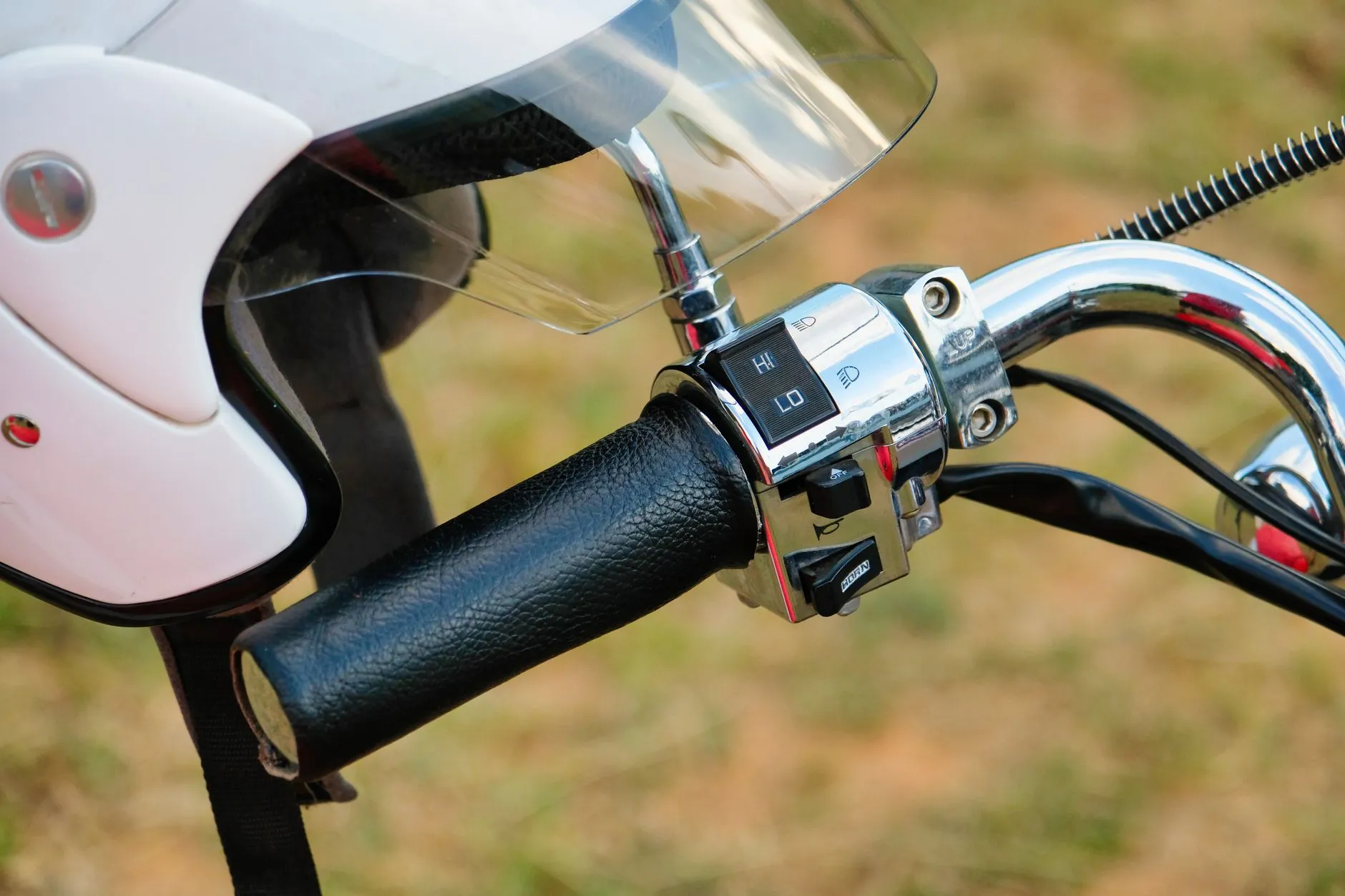
It always happens on the good roads. You are forty minutes out on a backroad you love, the sun is getting low, and the bike starts to feel wrong. Maybe the rear goes soft and squirmy. Maybe you thumb the starter at a gas stop and get nothing but a click. Maybe the fuel light came on a few miles back and you were sure you had enough. Either way, you are pulled over on a gravel shoulder with your helmet on the seat, phone in hand, working out who you can call.
A tow company can be a long wait and a big bill for a problem that a jump pack or a tire plug would fix in ten minutes. Friends may be an hour away or at work. Meanwhile there might be a rider five minutes up the road with a compressor in their saddlebag who would gladly come help, if they only knew you were there.
That is the problem Rider Assist was built to solve. It connects a rider who is safe but stuck with D76 members nearby who have said they are willing and able to help. Think of it as riders looking out for riders, with a lot of thought put into keeping everyone safe along the way. This week we rebuilt how it works from the ground up, so here is the full picture: how to ask for help, what happens behind the scenes, who sees what, and how to sign up to be the rider who shows up.
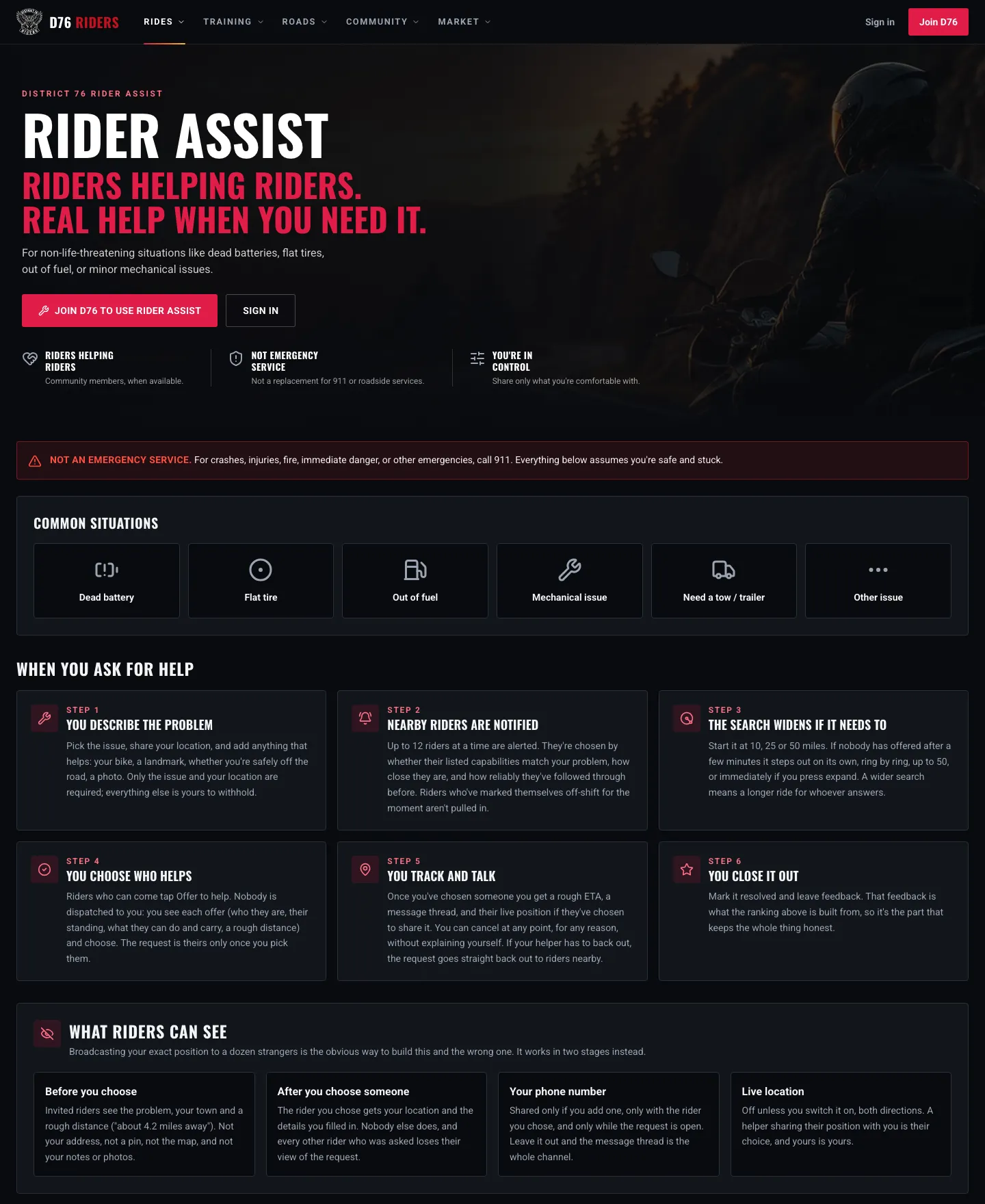
The Rider Assist page lays out the whole thing before you ever need it: what it covers, how a request works, and who sees what.
First Things First: This Is Not 911
Before anything else, the most important line on the page. Rider Assist is not an emergency service. If there has been a crash, if anyone is hurt, if there is fire, or if you are in immediate danger, call 911. Every time. The request page has a Call 911 button right at the top for exactly that reason.
Rider Assist is for the problems that leave you stranded but safe: a dead battery, a flat tire, an empty tank, a minor mechanical issue, or needing a ride for the bike when it simply is not going any further. It is also worth being straight about a few other things it is not:
- It is not a tow company. Some helpers have a trailer. Most do not, and nobody is obligated.
- It is not a guarantee. Nobody is on call. If no one nearby is free, nobody comes, and the site will point you to real shops near you instead.
- It is not a repair shop. Expect enough to get you moving or get you home, not a full fix.
- It is not insured or licensed. This is neighbors with tools, and we think it is worth saying that out loud.
With that understood, here is how it works.
Asking for Help
Signed-in members go straight to the request form from Rider Assist. It is built to be filled out with gloves half off and your heart rate up, so the first screen asks only two things: what you need help with, and where you are.
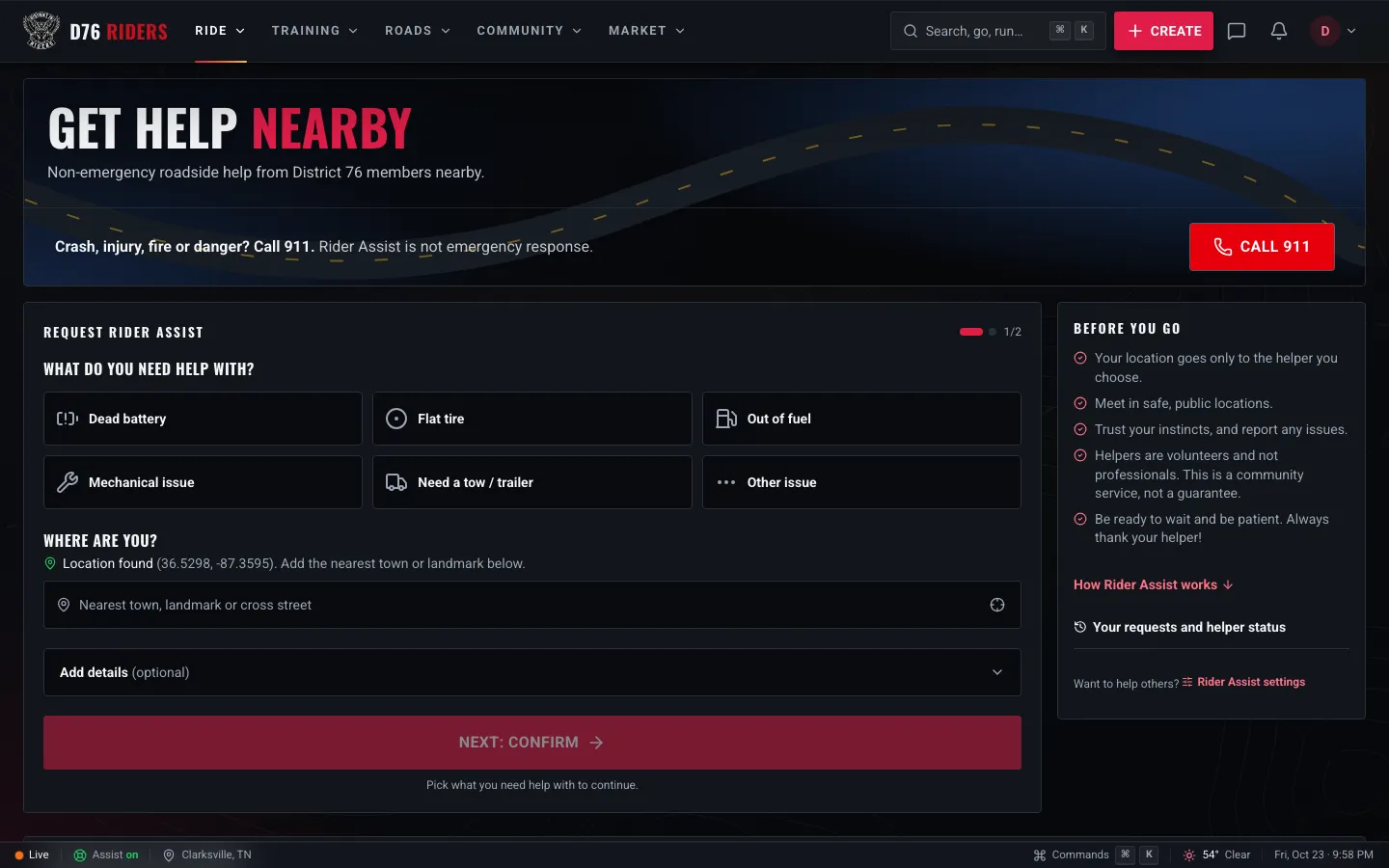
Step one of the request: pick the problem and confirm where you are. Everything else is optional.
Pick the problem from six choices: dead battery, flat tire, out of fuel, mechanical issue, need a tow or trailer, or something else. Then tap the locate button so your phone finds your position, and add the nearest town, landmark or cross street so a helper can find you once you have chosen one.
Everything past that is up to you. Open the details section and you can add:
- Your bike, picked straight from your garage, so a helper knows whether they are dealing with a sportbike or a full dresser.
- What is happening, in a few words. "Clicks but won't turn over" tells a helper to grab the jump pack.
- How to find you, like "gravel pull-off just past the bridge, north side."
- A phone number, if you want one. Only the rider you choose sees it, and only while the request is open.
- Up to three photos, of the tire, the battery area, or where the bike is sitting.
- Whether you are safely off the road. If you are not, every helper sees a red warning at the top of the request.
- How wide to start looking: 10, 25 or 50 miles.
Before you send, the form shows you how many helpers are available within your range right now and a rough idea of how long a response might take. It is a count, nothing more. You do not get names, faces or positions of the riders around you, because nobody signed up to have their whereabouts shown to whoever opens the form.
You can only have one request open at a time, and an unanswered request closes itself after two hours. Nobody should be sitting on a roadside watching a request that nobody is coming to.
Who Gets Asked
When you send it, Rider Assist alerts up to 12 riders at a time. They are not just the 12 closest people. Each one is picked for three reasons:
- They can actually fix your problem. Helpers list what they can do and what they carry. A flat tire goes to riders who said they can plug and inflate a tire, not to someone whose only skill is a jump start.
- They are close enough. Every helper sets how far they are willing to ride, and they are only asked about requests inside that distance.
- They follow through. Riders who have shown up and helped before rank higher. Riders who have backed out after being chosen rank lower.
Helpers who have marked themselves unavailable, or who are outside the hours they set, are not asked at all. And a rider already in the middle of helping someone else cannot offer on a second request until they finish the first.
If nobody has offered after a few minutes, the search widens on its own, ring by ring, from 10 to 25 to 50 miles, and asks the new riders it finds along the way. You can also widen it yourself at any time with one tap. A wider search means a longer ride for whoever comes, which is why it starts tight.
Riders Offer. You Choose.
This is the biggest change in the rebuild, and the one we are most glad to have made. Until now, the first helper to tap "I can help" took the request and got your location on the spot. That is fast, but it meant a stranger you had never seen was suddenly on their way to you, and you had no say in who it was.
Now nobody is dispatched to you. Riders who can come tap Offer to help, and each offer lands on your request as it comes in. For every rider who offers, you see:
- Their name and handle, with a link to their profile
- Whether they are verified, and their standing in the community
- About how far away they are, and a rough time to reach you
- What they can help with and what they carry
- Their support vehicle, and whether they can tow a trailer
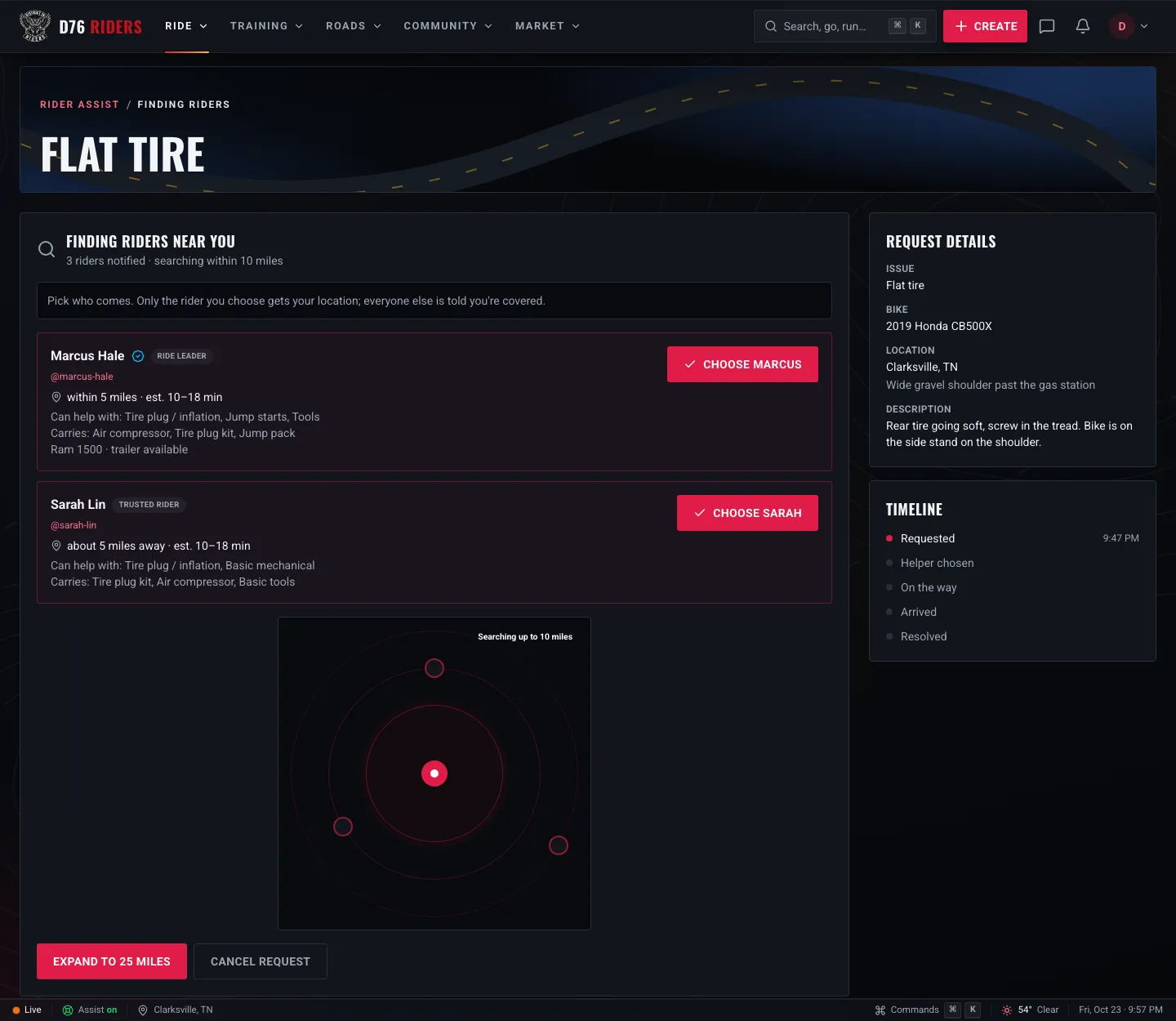
Two riders have offered on this flat tire. Each offer shows who they are, what they carry, and a rough time to reach you. You pick who comes.
You pick the one that fits. Maybe it is the rider with the compressor and the plug kit for your flat. Maybe it is the one with a truck and a trailer, because you already know the bike is done for the day. Maybe it is someone you have ridden with before. It is your call.
The moment you choose, three things happen. Your chosen helper gets an alert and your location. Everyone else who offered is told you are covered and thanked for offering. And every other rider who was asked loses their view of the request entirely.
The distances on offers are deliberately rough, along the lines of "within 5 miles." That is because they are measured from where the helper said they ride from, which may be their home. Their privacy matters as much as yours.
What Helpers See, and When
Broadcasting your exact position to a dozen strangers is the obvious way to build something like this, and it is the wrong one. Rider Assist hands information over in two stages.
Before you choose, an invited rider sees the problem, your town, a rough distance like "about 3.0 miles away," and your name and standing. That is it. Not your address, not a pin on a map, not your notes, not your photos and not your bike. Even the place you typed stays back, because "Exit 12" or "the church lot on Main" says more than a town does.
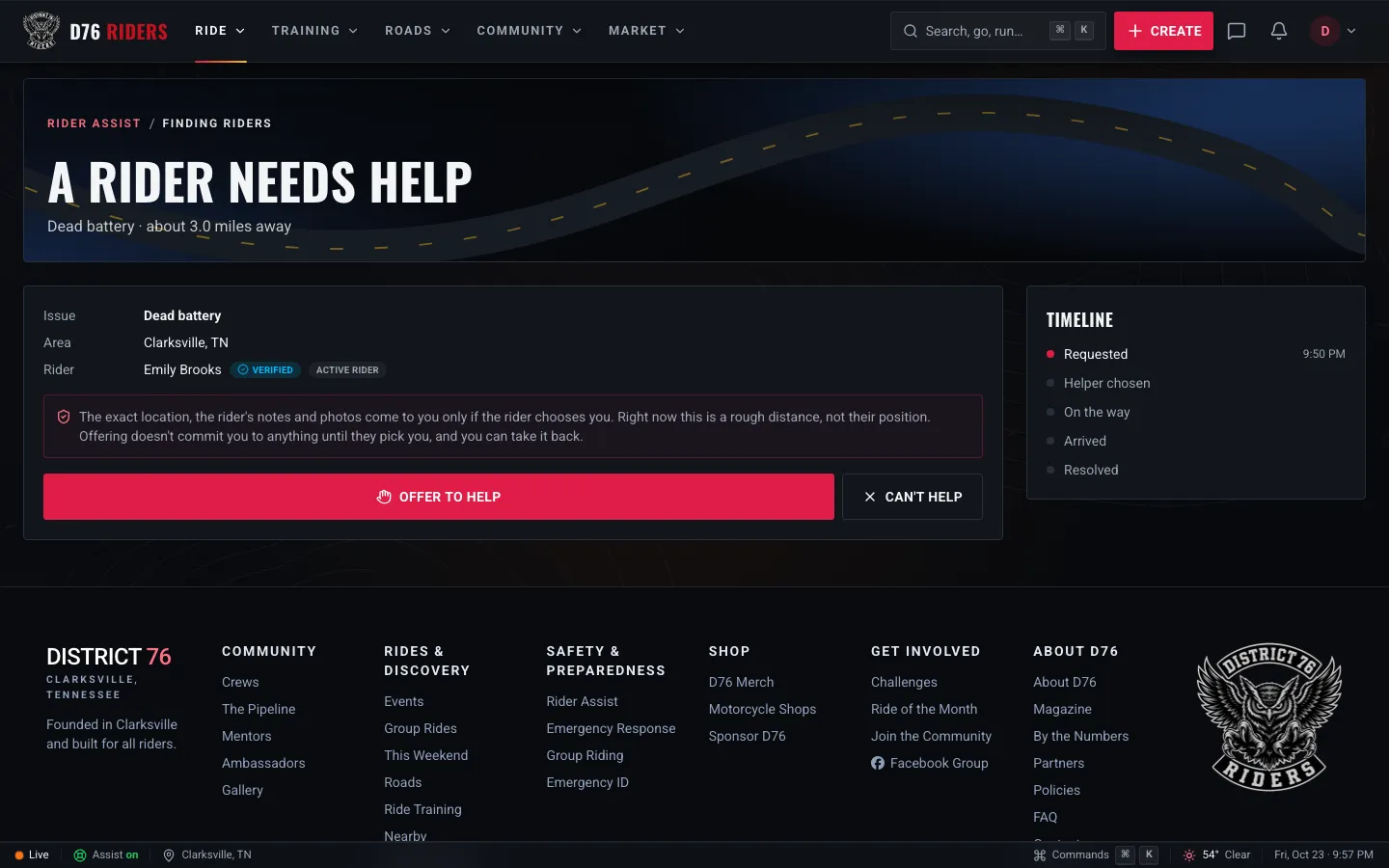
What an invited helper sees: the problem, the town and a rough distance. The location, notes and photos come only if the rider picks them.
Offering costs a helper nothing. It does not commit them to anything until you pick them, and they can take the offer back with one tap while they wait. Passing on a request costs nothing either, and it is not held against anyone.
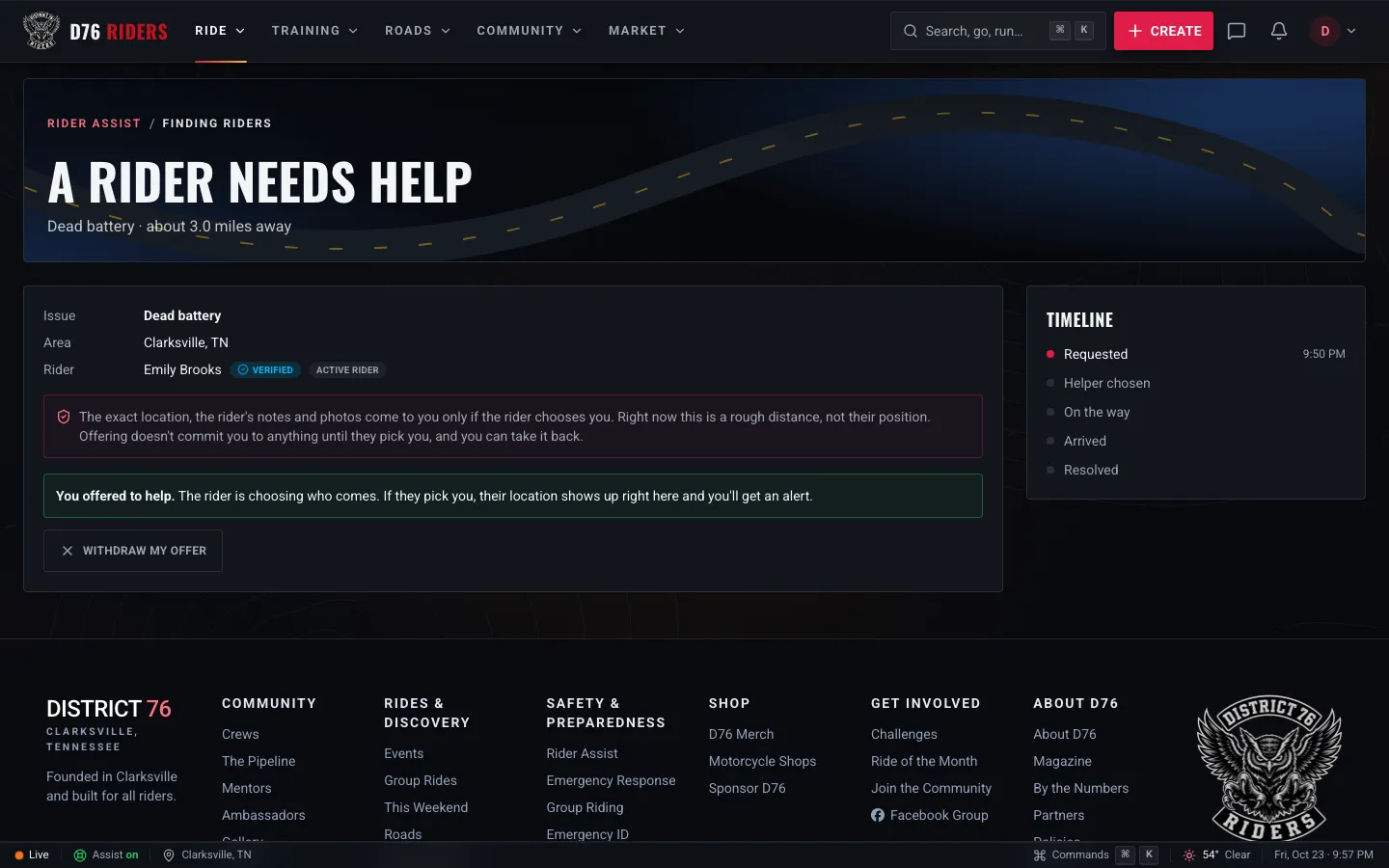
Once a helper offers, they wait for the rider to choose, and they can still withdraw.
After you choose, the rider you picked gets your location, your notes, your photos, your bike, and your phone number if you added one. Nobody else does.
Once Help Is On the Way
From the moment you choose someone, the request becomes a shared page between the two of you, and it updates on its own while it is open, so nobody has to keep refreshing.
Your helper gets directions to you with one tap. They mark when they are on the way and when they have arrived, and you see each step on the timeline. If they choose to, they can share their live position so you can watch them come up the road. Live location is off unless someone switches it on, in both directions, and turning it off clears the last position it sent.
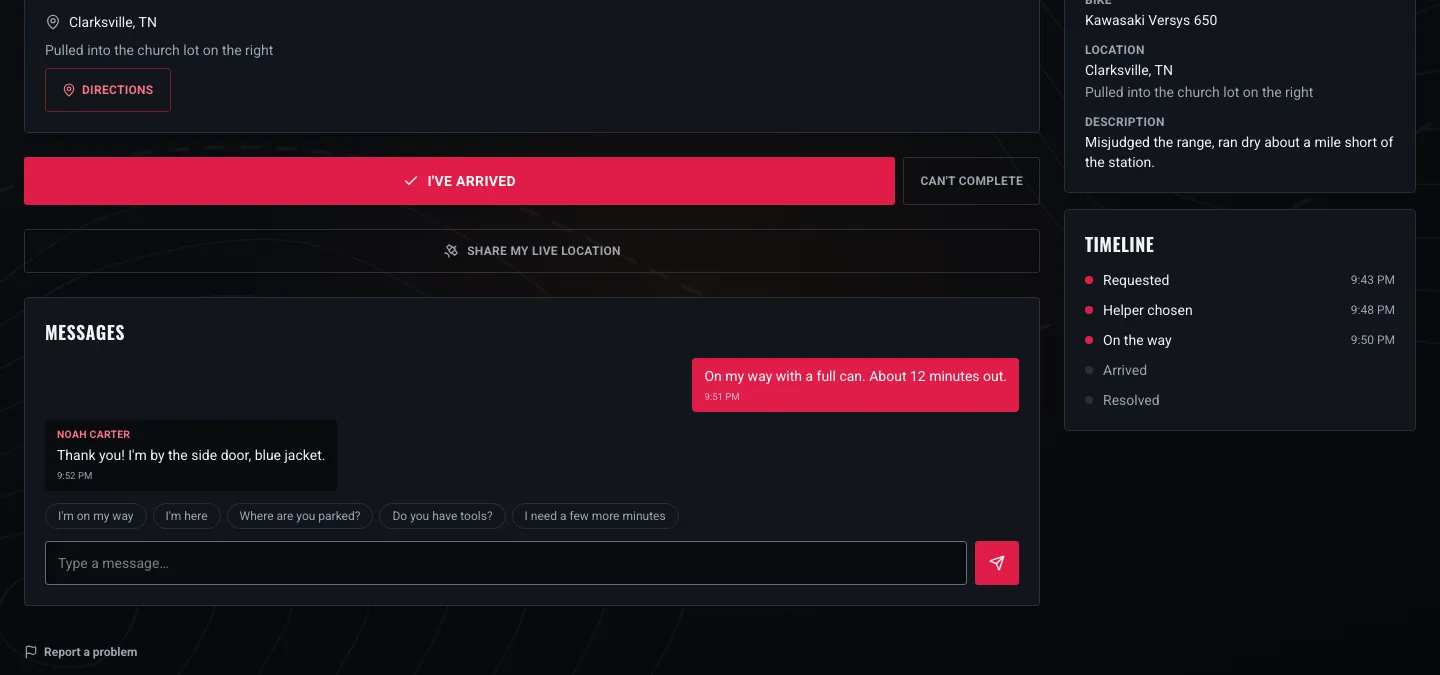
The helper's side once they are chosen: progress buttons, optional live location, and a message thread with the rider.
There is a message thread built in, with quick replies like "I'm on my way" and "Where are you parked?" for when typing on a phone on the side of the road is the last thing you want to do. If you added a phone number, your helper can call you straight from the request. If your helper added one in their settings, you can call them too, but only while the request is open.
When you are back on the road, tap I've been helped. You will be asked two optional questions: did they help, and would you ask them again. The answers stay private. They are not a public star rating, and nobody sees how you answered. They feed the ranking that decides who gets asked first next time, which makes them the part that keeps the whole thing honest.
When Plans Change
Real life does not always go to plan, so Rider Assist is built for that too.
- You can cancel at any point, for any reason, without explaining yourself. Got the bike started on your own? A buddy showed up? Cancel, and everyone involved is told.
- If your helper has to back out, the request does not just die. It goes straight back out to riders near you. The riders who offered or were asked before you chose are invited again, the clock starts over, and your location is pulled from the helper who left. Backing out after being chosen does count against a helper's ranking, because a rider stopped looking for help to wait on them.
- If nobody can come, the request shows real shops and services near you, nearest first, with a button to call, so failure still leaves you somewhere to turn.
- If an assist is never marked resolved, it closes on its own after six hours, so your location never sits in someone else's hands indefinitely.
If Something Feels Wrong
Every request has a report link, for either side. If a situation feels wrong when you arrive, the ground rule is simple: leave, then report it. That includes a helper who was chosen and then walked away because something was off. They can still file a report afterward.
Reports go to D76 admins, and admins can suspend a member from Rider Assist entirely, which stops them asking for help, offering it, and being chosen. A rule nobody enforces is not a rule, so please use it.
A few common-sense habits help too: meet in safe, public spots when you can, trust your instincts, and remember that repairs are at your own risk on both sides. Nobody here is a certified mechanic by default.
Keeping Track
Your Rider Assist dashboard keeps everything in one place: your open request, any riders near you who need help right now, the history of requests you have made and riders you have helped, and your helper numbers.
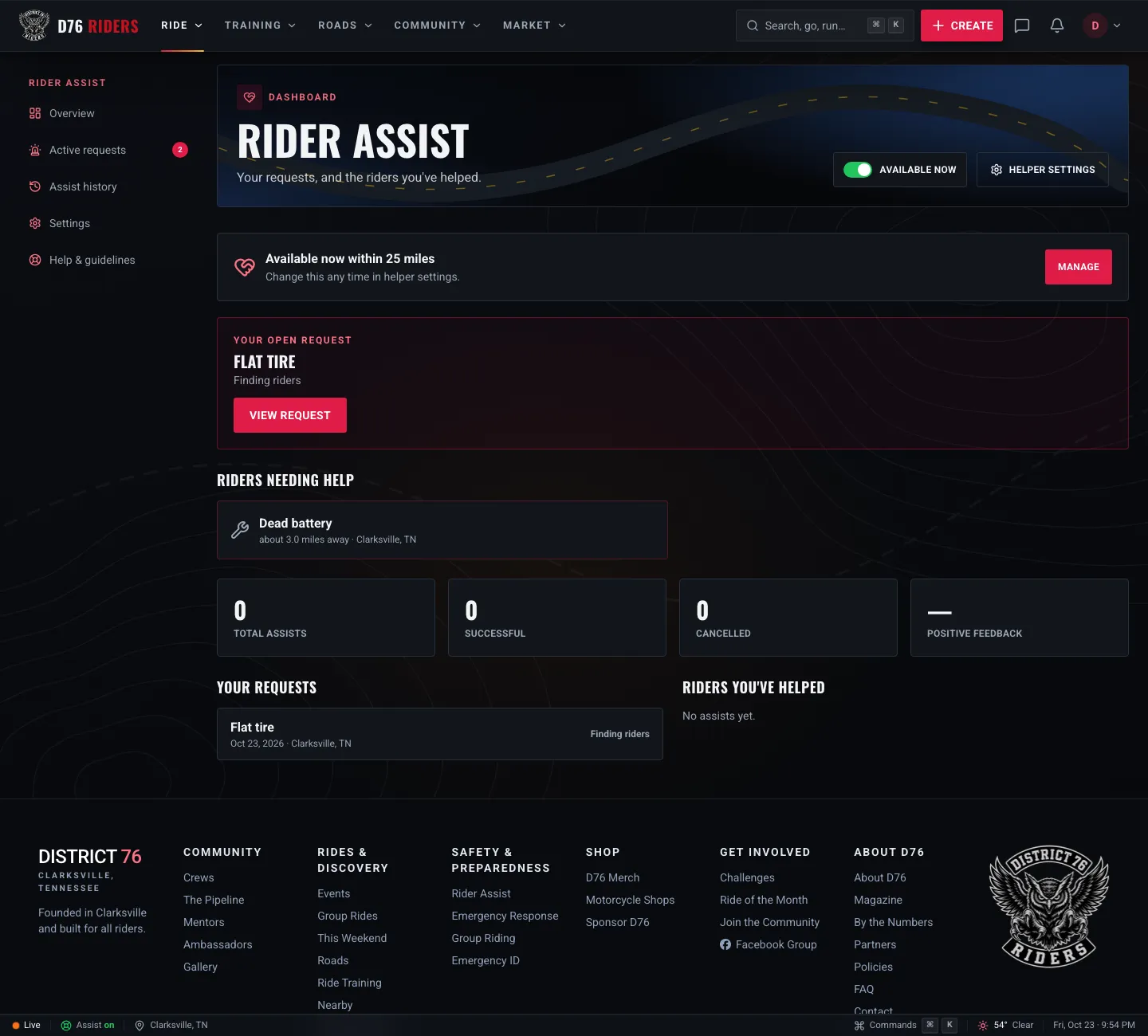
The dashboard: your open request, riders nearby who need a hand, and your history on both sides.
If you have offered on someone's request and are waiting on them to choose, it shows right on the card so you are never left wondering.
Becoming a Helper
Here is the part that makes all of this work: riders willing to show up. Helping is opt in and always off until you turn it on. To help, you need to be a D76 member with a confirmed email and Active Rider standing or better, which you earn by showing up to group rides and logging your rides. That standing exists so a stranded rider knows the people offering have a track record in the community.
Turn it on in Settings, Rider Assist, then tell the site what you can genuinely do:
- What you can help with: jump starts, battery help, tire plugs and inflation, fuel delivery, basic mechanical, electrical diagnosis, trailer and towing, transportation, tools, or general roadside help.
- What you have on hand: a jump pack, air compressor, tire plug kit, basic tools, a motorcycle stand, trailer, ramp, tie downs, fuel can or multimeter.
- How far you will ride to help someone.
- The hours you are actually available, if you want the site to switch you on and off on a schedule.
- A support vehicle and a phone number, both optional and both shown only to a rider who chooses you.
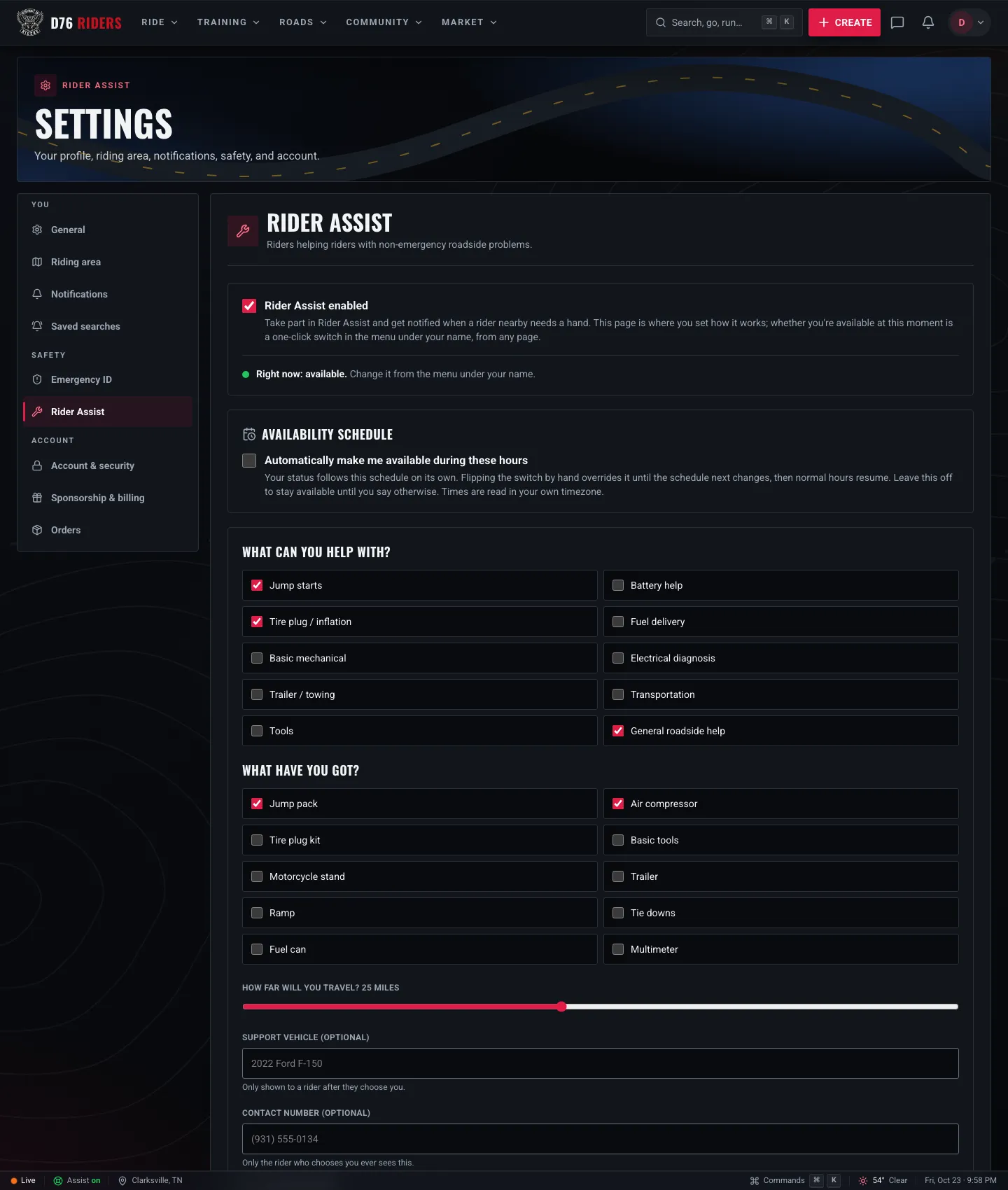
Settings, Rider Assist: what you can help with, what you carry, how far you will go, and when you are available.
You will only ever be asked about problems you said you can solve, inside your distance, during your hours. Whether you are available at this moment is a one-tap switch in the menu under your name, from any page, so you can step off while you are at work or out of town and back on when you are free.
A few ground rules for helpers, straight from the page:
- Only claim capabilities you actually have and actually carry.
- Do not offer on a request you cannot reach in reasonable time.
- Ride to it like any other ride. A stranded rider is not worth a crash.
- No charging for help. Reimbursement for fuel or parts is between the two of you.
- If a situation feels wrong when you arrive, leave. Then report it.
Final Thoughts
Riders have always looked out for each other. It is in the wave on the highway, in the bike pulled over to check on someone on the shoulder, in the buddy who drives an hour with a trailer on a Sunday night. Rider Assist does not replace any of that. It just helps the right rider find out you need them, while keeping you in charge of who comes and what they see.
If you are not a member yet, joining D76 is free, and Rider Assist comes with it. If you are a member, take two minutes to set up your helper profile. The next rider stuck on a gravel shoulder might be ten minutes from you.
Ride what you ride. Rep who you rep. Respect everyone.
Finish this story. It's free
Create your free District 76 account to read the rest, save articles, and join the discussion.
Already a member? Log in

@worlddrknss
I’m basically a walking collection of expensive hobbies and a complete absence of free time!
Roads worth riding
Community-rated routes from the D76 road guide.
- Old Lock B Boat Rampin TN
- FS141 to Persimmon Pointin KY
- Fort Donelson Ride Outin TN
- Natchez Trace Parkway (TN)in TN
0 Comments
Sign in to join the discussion.
- No comments yet. Be the first to weigh in.